Scorer Guide
The day
An example, start to finish, of a club tournament scored with the scorer.
- The Club Open, one Saturday: one category, mixed doubles 4.0, on six courts. Pools in the morning (one game to 11), knockouts in the afternoon (best of 3 to 11).
- Aisha, the tournament director (TD), runs the draw from the desk with a helper.
- Six referees, one a court, each scoring on their own phone. We follow one of them, Ray, on court 3.
Who does what:
- The TD, before the day: a results group, the match label, each court’s schedule, the teams and a brief.
- Each referee, the night before: the match settings, a practice.
- Each referee, on the day: scan the court’s teams at the desk, score each match, have both teams confirm, share the result to the group.
- The desk, on the day: call the knockout matches, call late players when asked, and enter each result in the draw as it arrives.
1. A week before: the TD
Make a results group
Aisha makes a WhatsApp group, Club Open · Results, with the TD, the desk helper and the six referees. Every result and every “please call this player” comes to this one thread, rather than to each person separately.
- Keep it for results and desk calls only; chat goes elsewhere.
- Check that disappearing messages are off: the thread is the day’s record.
- Add a referee standing by, so a spare phone is ready to take over a match.
Decide the match label
Each result arrives headed by its match label, so the label is how the desk finds the match in the draw. Aisha settles on three parts, from what changes least to what changes most:
referee’s initials · court · round
RY · Ct 3 · R1
- Courts: Ct 1 to Ct 6.
- Rounds: R1, R2, R3 for the pools; QF, SF and F for the knockouts.
With the round last, a referee reuses the previous label with one tap and changes only the end. With the initials first, the desk knows whom to ask about a result.
Assign the matches
The scorer doesn’t assign matches: each referee needs to know which match is next on their court. Aisha does it two ways.
The pools: a timed schedule for each court. Each referee keeps one court for the morning. Once the draw is final, a couple of days before, Aisha sends each court’s matches to the players and posts them to the referees’ group, each with its start time:
Court 3 · Ray (RY) · pool A
9:00  R1 Hassan Abdullah & Mei Ling Tan v Ana Reyes & Bryan Lim
9:20  R1 Priya Nair & Daniel Koh v Joyce Ong & Arjun Rao
9:40  R2 Hassan Abdullah & Mei Ling Tan v Priya Nair & Daniel Koh
10:00 R2 Ana Reyes & Bryan Lim v Joyce Ong & Arjun Rao
10:20 R3 Hassan Abdullah & Mei Ling Tan v Joyce Ong & Arjun Rao
10:40 R3 Ana Reyes & Bryan Lim v Priya Nair & Daniel Koh
Each match is called at its time, or as soon as the match before it ends if that runs late. The referee calls it without waiting for the desk.
The times settle when a match was due to start: the players have had them for days, so the no-show clock runs from the scheduled time. Only a late-running match before it moves the start, and then the clock runs from when the court came free.
The knockouts: called by the desk. Who plays depends on the morning’s results, so as a court comes free the desk calls the next match over the PA, hands that court’s referee a slip and shows the match’s code (below): the whole match, set up on the desk’s phone.
Ct 3 · QF
Hassan Abdullah & Mei Ling Tan v Priya Nair & Daniel Koh
Key in the teams
So no one types a name on court, Aisha keys every team into the scorer on her own phone once the draw is final: List beside Players on match setup, then paste, one team a line, each name spelt as registered. No headings or seeds: each line becomes a team.
Hassan Abdullah / Mei Ling Tan
Ana Reyes / Bryan Lim
Priya Nair / Daniel Koh
Joyce Ong / Arjun Rao
…
Numbering and bullets at the start of a line are fine: they’re dropped.
On the day she gives each referee their court’s pool as a code, and each knockout match, set up whole, as a code with its slip. So referees needn’t type or paste any names.
Send the brief
Then Aisha posts the brief, and pins it:
Scoring at the Club Open
1. Before the day: open play.bikote.app/score,
   add it to your home screen, and try the Tutorial.
2. At the desk on the day, scan your court's
   code: Scan, at the top of match setup. For a
   knockout, scan the match's code with the slip.
3. Match label: initials · court · round
   Rounds: R1–R3 (pools), QF, SF, F
   e.g. RY · Ct 3 · R1
4. Pools: 1 game to 11 (Match settings → Edit).
   Knockouts: best of 3 to 11, set by the desk's code.
   Pools: call each match at its time on your
   court's schedule, or when the one before ends
   if that runs late.
   Knockouts: the desk calls each match.
5. Player late? Start the no-show timer, then
   tap the yellow megaphone and send it here.
6. After the match, both teams confirm on your
   phone. Then Share, and send the result here.
Guide: play.bikote.app/help
2. The night before: each referee
Ray gets the phone ready, at home, in five minutes:
- Opens play.bikote.app/score, adds it to the home screen (on an iPhone, Share → Add to Home Screen) and opens it once from the new icon, so it opens quickly at the club and, on an iPhone, the matches are kept (see Home screen).
- Plays the Tutorial, a short practice match, to get a feel for tapping the side that won.
- Taps Edit under the match settings and sets the pool format: doubles, standard scoring, 1 game to 11. The scorer keeps it for every match until it’s changed.
- Leaves the phone charging.
3. On the day: the first match
8:45. Ray opens the scorer at the desk, where there’s signal: once it’s open, scoring needs none. The first match is the first on the court 3 schedule, at 9:00: pool round 1, Hassan Abdullah & Mei Ling Tan against Ana Reyes & Bryan Lim.
Aisha shows court 3’s code: Send to a referee on her player list, the label Court 3, and the four pool A teams tapped in the order they first appear on the schedule. Ray taps Scan at the top of match setup and points the phone at hers: the four teams join Ray’s list under Court 3, numbered 1 to 4.
Match setup
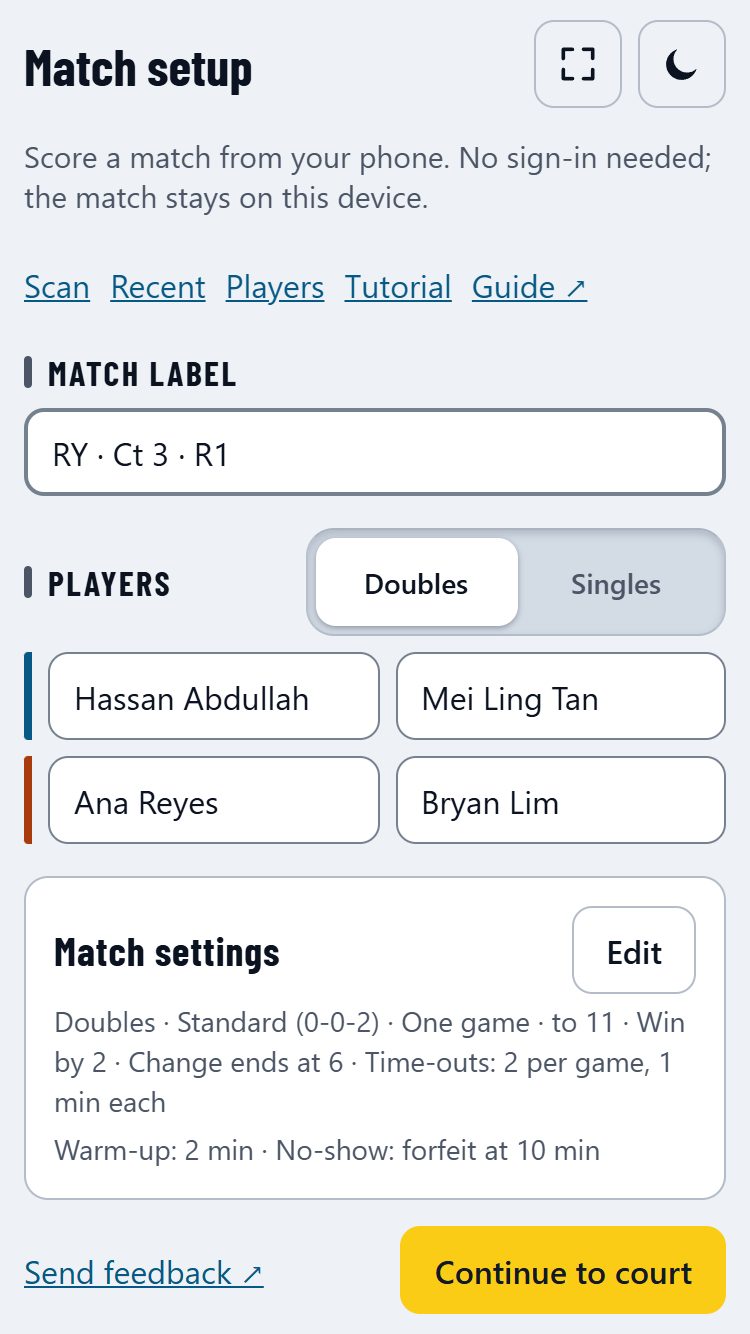
- Match label: RY · Ct 3 · R1.
- Names: tapping the first name box offers court 3’s teams, numbered as on the schedule: 1 · Hassan Abdullah & Mei Ling Tan, then 2 · Ana Reyes & Bryan Lim. Two taps, every name spelt as registered.
- The settings summary reads one game to 11. Continue to court.
On court, with a player missing
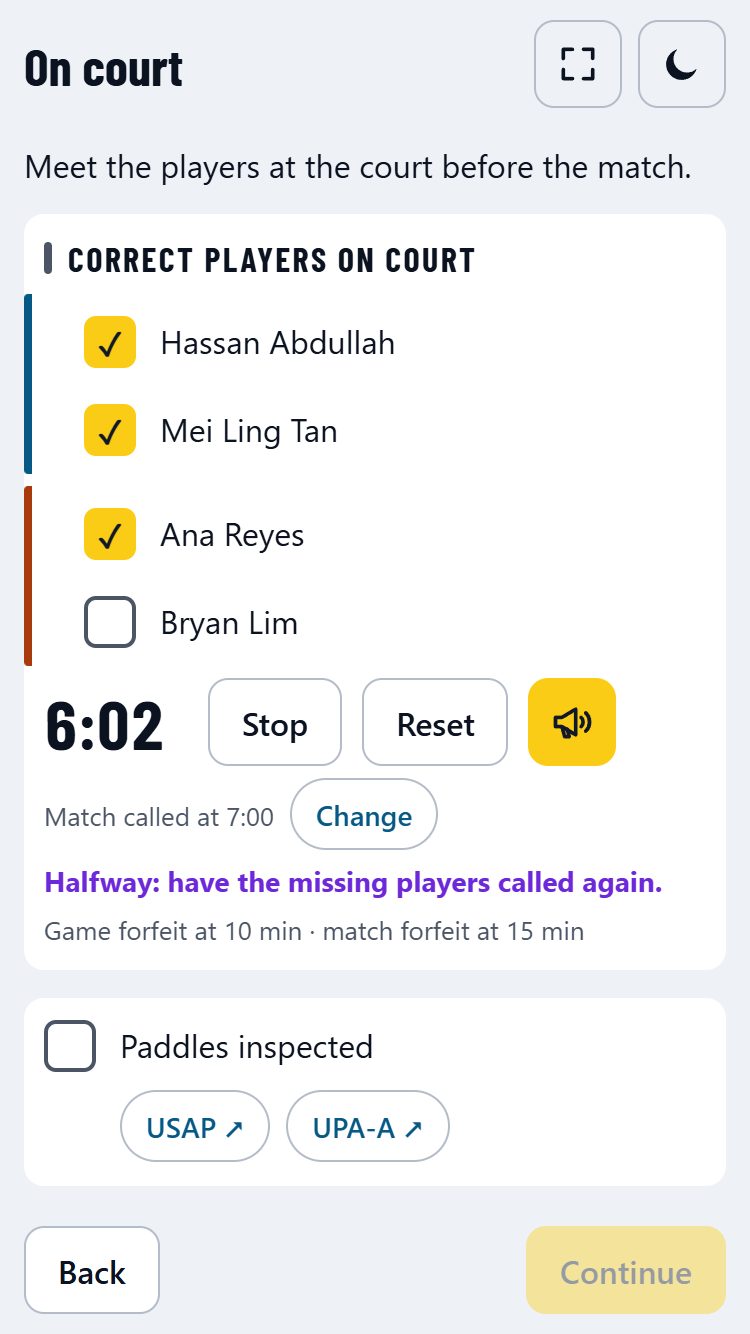
9:02. Hassan, Mei and Ana are there; Bryan isn’t. Ray ticks the three and taps Start no-show timer. The match was due at 9:00, so Ray answers 2 min ago: the clock runs from the scheduled time. Then Ray taps the yellow megaphone, picks WhatsApp and the results group, and sends:
RY · Ct 3 · R1
Please call to court: Bryan Lim
Called at 9:00 · match forfeit at 9:10
At the desk, the helper calls Bryan over the PA. Meanwhile Ray briefs the three, checks their paddles, tosses the coin and starts the warm-up: only the first serve waits.
9:07. Bryan jogs over from the car park. Ray ticks Bryan, gives the brief, checks the paddle, and taps Start game.
Scoring
Ray taps the half of the team that won each rally and calls the score at the top of the screen (“4-2-1”). A wrong tap? Undo. Ana and Bryan call a time-out at 3–8: Time-out on their side, and the minute is timed.
The result
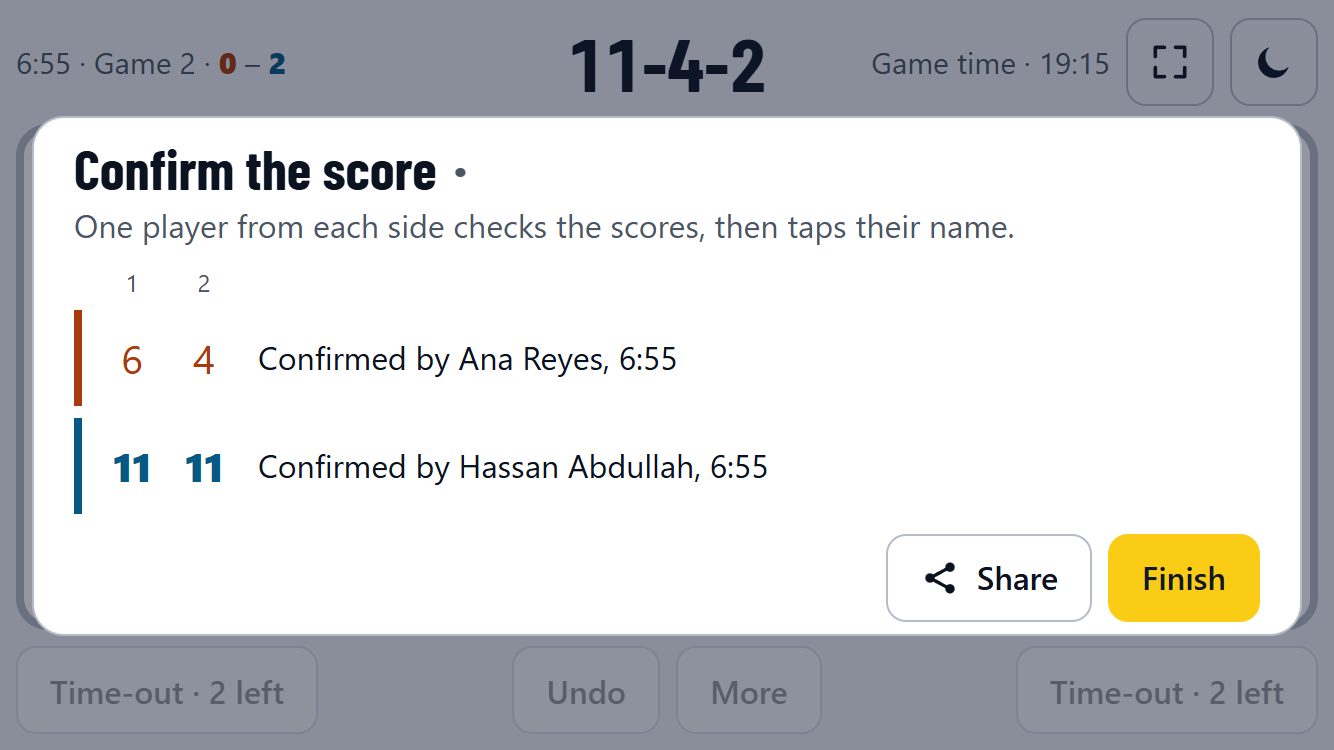
- At 11–6, Ray taps Confirm with players and hands the phone over. Hassan, then Ana, each taps their own name: in place of initials on a scoresheet.
-
Share → WhatsApp → Club Open · Results → send:
RY · Ct 3 · R1
Sat 14 Nov, 9:07–9:24
Hassan Abdullah & Mei Ling Tan beat Ana Reyes & Bryan Lim
11–6
Confirmed by both teams
- Finish. The match is kept in Recent matches, marked Shared.
4. The next matches
The first match ends at 9:24, after the second was due at 9:20, so Ray calls the next pair to court straight away. Had a player been missing, the clock would have run from the call (Just now), as the court only came free then. Each match after the first takes seconds to set up:
- The label: tapping the label field offers Ray’s recent labels. The second match is round 1 too: one tap on RY · Ct 3 · R1 is all. For the third, the same tap, then change the end: R2.
- The names: court 3’s teams, as before: two taps. A team already playing on the other side isn’t offered.
- The settings stay as they were: one game to 11.
At 1:00 the knockouts start, and the desk calls each match as a court comes free. With the slip for court 3’s quarter-final, Ray scans the code Aisha shows with it: she set the match up on her phone (the label Ct 3 · QF, the two teams from her list, best of 3) and tapped Send to a referee. Ray’s match setup fills in; Ray puts RY · in front of the label and taps Continue to court. In the third game, the scorer shows the end change at 6, and the 2-minute break between games is timed.
Had the desk sent it as one game, the format between the two scores before the first serve would say “One game”, not “Best of 3 games”: the moment to catch it, with More → New match.
5. At the desk
The group fills up through the day, one message a match, each headed by its label. Aisha and the helper:
- Enter each result in the draw as it arrives: the label says the court and the round; the scores are given from the winner’s side; and “Confirmed by both teams” says the players agreed. A forfeit or retirement is noted after the scores.
- Call the knockout matches: as a court comes free, call the next match over the PA and hand that court’s referee its slip.
- Answer the desk calls: a “Please call to court” message gives the match, who to call and the forfeit time, as a time of day, so it’s right however late it’s read. Calling the player, the helper replies “called” to it, so Ray knows.
- Find a round’s results by searching the group for it, such as “QF”.
- Chase a missing result: the initials say whose it is. Ray finds it in Recent (it isn’t marked Shared) and shares it from there.
- Decide when asked: more time for a late player (the referee taps TD allowed more time), or the winner when both teams are late.
When things go off script
- Bryan never arrives. At 9:10, the forfeit time (10 minutes, as a one-game match has only the one), Ray checks with the desk and taps Record match forfeit. The result shared reads “By forfeit · No-show”.
- A team says the score is wrong. On the confirm screen, Ray taps The score is wrong, goes back through the rallies with Undo (or checks Rally history with them), and confirms again.
- Rain at 10:30. Ray suspends play (More → Stop play → Suspend match). When the match resumes on court 5 with Joyce refereeing, Ray taps Hand over and Joyce scans the QR code: the whole match moves to Joyce’s phone, and Joyce shares the result when it ends.
- Ray’s phone is down to 5%. Between rallies, Ray suspends play (reason: Other) and hands the match over the same way, to the standby referee’s phone.
- No signal on court 6. Scoring carries on. Ray shares the result as usual and WhatsApp sends it once there’s signal; if it didn’t go, it’s in Recent matches to share again.
Afterwards
- The results group is the day’s record, every result with when it was played and who confirmed it. Aisha can export the chat to keep it.
- Each referee’s phone keeps its last 30 matches, every rally, for any question later.
- The teams from the desk stay on each referee’s player list, under Court 3 and each match’s label, until they tap Remove under them. Aisha keeps her teams for the next event, or clears them from the player list.
Step by step, everything above is in How to score. Questions or suggestions? Use Send feedback on match setup, or email support@bikote.app.